AI Agent Systems
Best practices for building AI agents.
A useful agent is not a clever prompt with a big model behind it. It is a production workflow with scope, tools, permissions, evaluations, logs, feedback loops, and a human owner. The model matters. The system around the model matters more.
Published 2026-05-02 | By Herb Trevathan
Start narrow
Pick one workflow with a clear owner, clear inputs, clear outputs, and a visible business result. Broad agents fail quietly because nobody can tell what correct behavior means.
Use tools carefully
An agent is useful when it can call real systems. It is risky when those tools are vague, overpowered, or allowed to write data without review.
Evaluate before launch
Build a small set of real examples before the first production release. The agent should pass known cases, edge cases, refusal cases, and escalation cases.
When to Build One
Build an agent when the workflow needs judgment plus action.
Agents are useful when the work includes messy language, documents, exceptions, changing context, tool selection, or multi-step decisions. They are less useful when the workflow is fixed, the rules are stable, and code can handle the path reliably.
The first question is not, "Can AI do this?" The better question is, "Which part of this workflow benefits from model judgment, and which part should stay deterministic?" That split is where reliable agent architecture begins.
Design Foundation
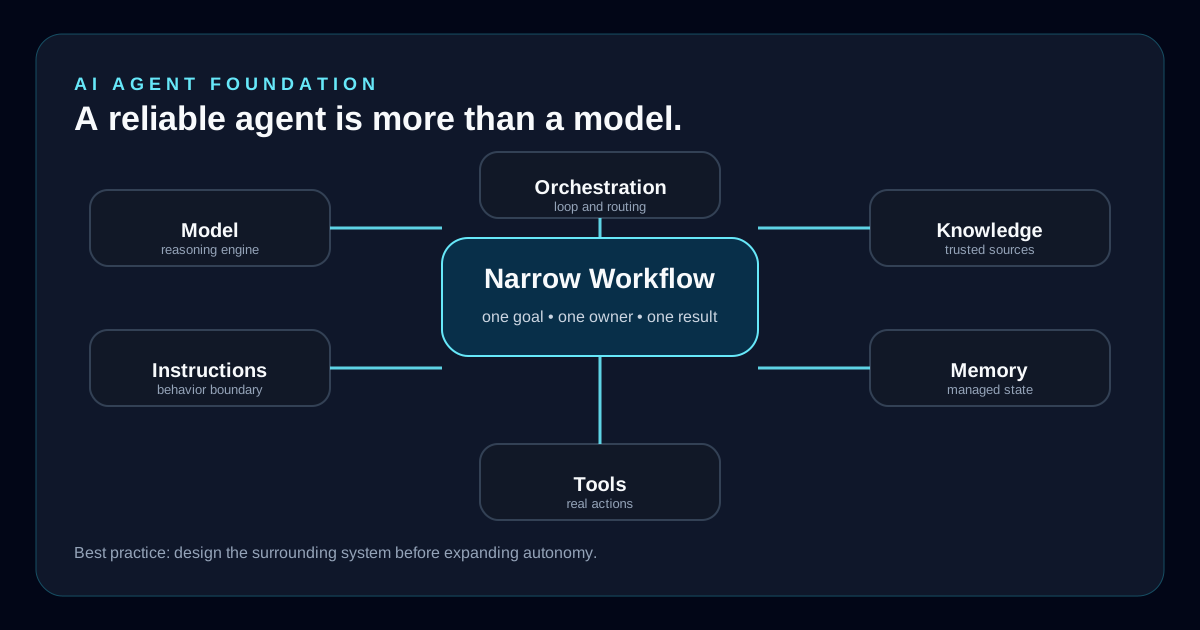
A reliable agent has six moving parts.
Most weak agents fail because the team only thinks about the model. The model is the reasoning engine, but it needs instructions, tools, knowledge, memory, and orchestration around it. Each part needs a boundary.
Model
Choose the model for the job: reasoning depth, latency, cost, context length, multimodal input, privacy, and reliability.
Instructions
Write durable instructions that explain the role, boundaries, tone, escalation rules, tool use rules, and what the agent must never do.
Tools
Expose only the functions the agent needs. Use typed inputs, narrow permissions, predictable errors, retries, and audit logs.
Knowledge
Ground the agent in trusted content. Keep retrieval sources organized, current, scoped, and labeled with enough metadata to support confidence.
Memory
Store useful state intentionally. Do not let stale, private, or low-confidence information quietly control future decisions.
Orchestration
Decide whether the workflow needs one agent, a manager agent with specialists, a deterministic script, or a hybrid of code and model reasoning.
Guardrails
Guardrails are not polish. They are part of the system.
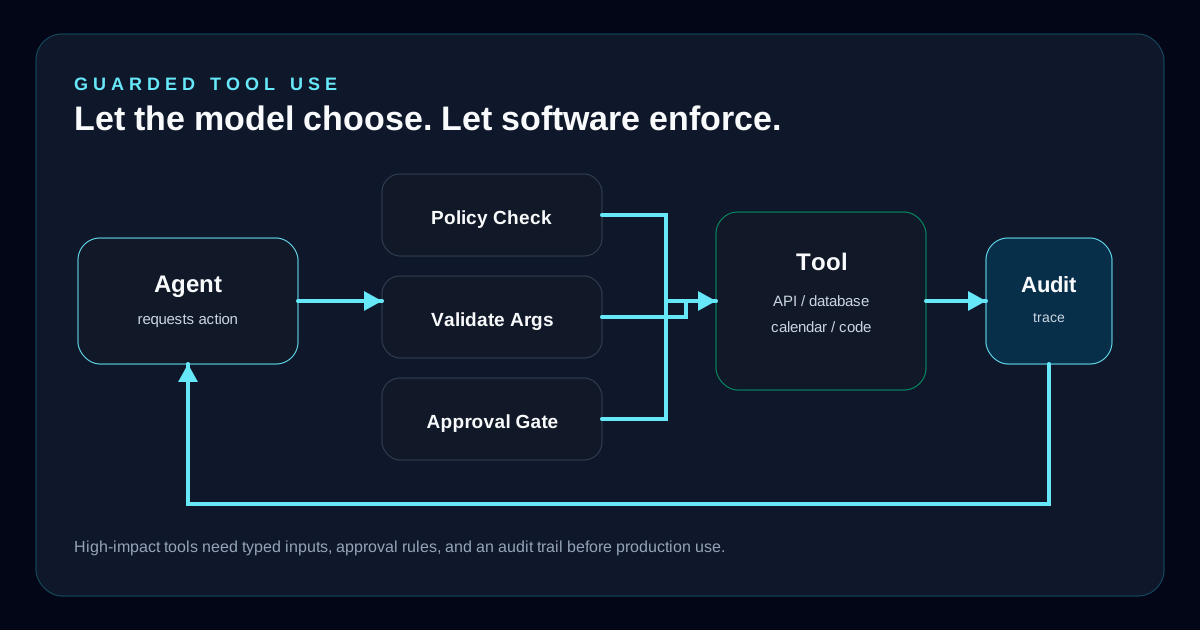
The agent should know what it can do, what it cannot do, when it must ask for help, and when it must stop. Important policies should live in software controls, not only in prompt text.
Practical controls
- Restrict tool access by task, user role, environment, and risk level.
- Require human approval for payments, messages, account changes, deployments, deletions, and sensitive customer decisions.
- Prefer deterministic code for steps that are fixed, repeatable, regulated, or easy to express as business logic.
- Validate tool arguments before execution and validate tool results before the model relies on them.
- Set loop limits, cost limits, timeout limits, and retry limits so an agent cannot run indefinitely.
- Log prompts, tool calls, observations, decisions, confidence, approvals, and final outcomes.
Evaluation
Build the test set before trusting the demo.
A demo usually proves the agent can handle the obvious case. Production proves whether it can handle real users, stale data, missing context, confusing language, failed tools, and risky requests.
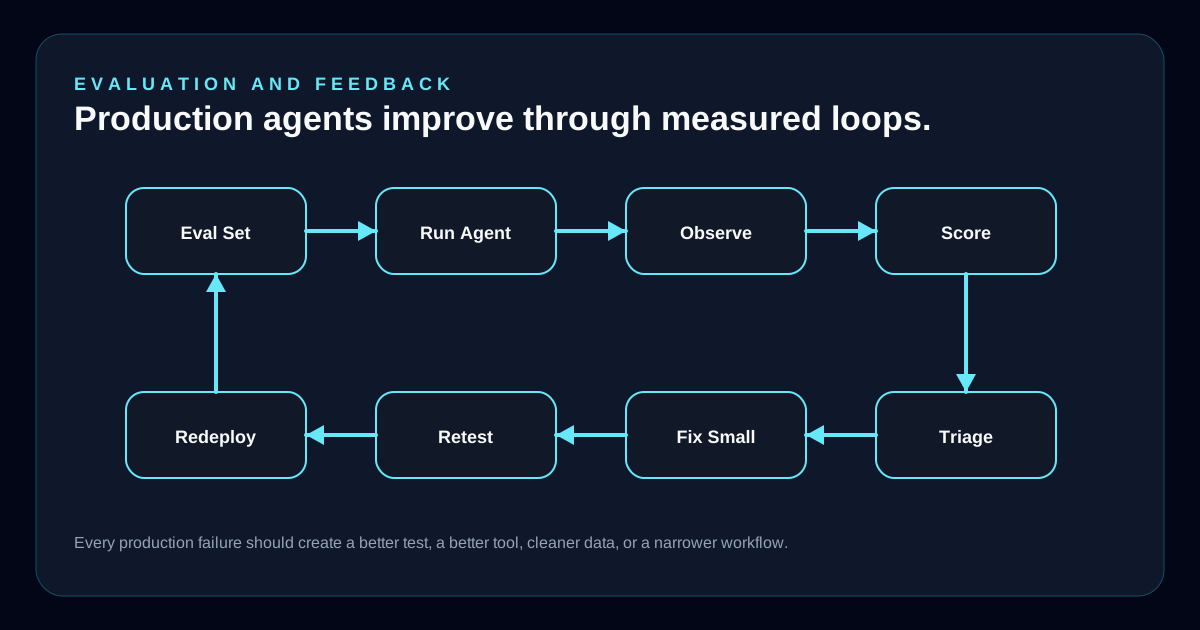
Start with a small but honest evaluation set. Add examples from real transcripts as the agent runs. Every failure should become either a test case, a tool fix, a data fix, a prompt fix, or a workflow change.
Happy path
The agent completes the normal workflow correctly with realistic customer wording and expected data.
Edge cases
The agent handles missing data, ambiguous requests, conflicting records, unavailable tools, and unusual wording.
Safety cases
The agent refuses, pauses, or escalates when a request is risky, unauthorized, private, destructive, or outside scope.
Regression cases
The agent keeps passing important examples as prompts, tools, documents, policies, and models change.
Post-Launch
Launch is the start of agent ownership.
Traditional software can often stabilize after release. Agents keep meeting new wording, new documents, new edge cases, and new user expectations. A production agent needs an operating loop after launch: review failures, sort the cause, make the smallest fix, test again, and watch the metrics.
Instruction issue
The agent had the right data and tools but followed the wrong behavior. Fix the prompt, examples, role, or escalation rules.
Tool issue
The agent called the wrong tool, passed bad arguments, retried poorly, or misunderstood the tool response. Fix schemas and tool descriptions.
Data issue
The agent answered from stale, incomplete, or poorly organized knowledge. Fix the source, retrieval pipeline, metadata, or freshness process.
Workflow issue
The job should not be handled by model reasoning alone. Move fixed steps into code and use the model where judgment is useful.
Anti-Patterns
Most agent failures are avoidable.
The common mistakes are not mysterious. Teams start too broad, skip evals, overuse model reasoning, give tools too much power, and treat launch as the finish line.
- Trying to build a universal agent before one narrow workflow works reliably.
- Giving the model broad write access because the demo looked impressive.
- Using prompt text as the only policy layer for high-impact actions.
- Letting the agent reason through deterministic business rules that should live in code.
- Shipping without representative test cases, transcripts, monitoring, or owner review.
- Adding memory before deciding what should be remembered, for how long, and who can see it.
- Measuring activity instead of outcomes: tool calls, chat volume, and token use are not business value.
Launch Checklist
A production agent should pass these checks.
This is the practical bar before expanding an agent beyond a pilot. If the team cannot answer these questions, the agent is probably still a prototype.
- The agent has one named owner responsible for behavior after launch.
- The use case has a clear success metric and a clear failure metric.
- Tools are scoped, typed, logged, and protected by permissions.
- Risky actions require approval or a deterministic workflow.
- The evaluation set includes real examples, edge cases, and refusal cases.
- The team can inspect failed conversations and sort them into fix categories.
- The fallback path is clear when the agent is uncertain, blocked, or wrong.
HerbDev Perspective
Build agents like software you will have to maintain.
The real work is not making an agent appear intelligent in a demo. The real work is keeping it useful when the inputs are messy, the tools fail, the data changes, the user asks something unexpected, and the business still needs a correct outcome.
That requires senior ownership: narrow scope, deterministic paths where they belong, guarded tool access, honest evaluations, clear escalation, and enough observability to know what happened after every important decision.