HT
HerbDev Application Rescue

AI Mobile App Architecture

Embedded AI vs cloud AI for mobile apps.

Artificial intelligence is changing what mobile apps can do. A modern app can recognize images, understand speech, summarize information, classify data, identify patterns, and assist users in practical ways.

The first architecture question is simple: should the AI live inside the app, or should it live in the cloud?

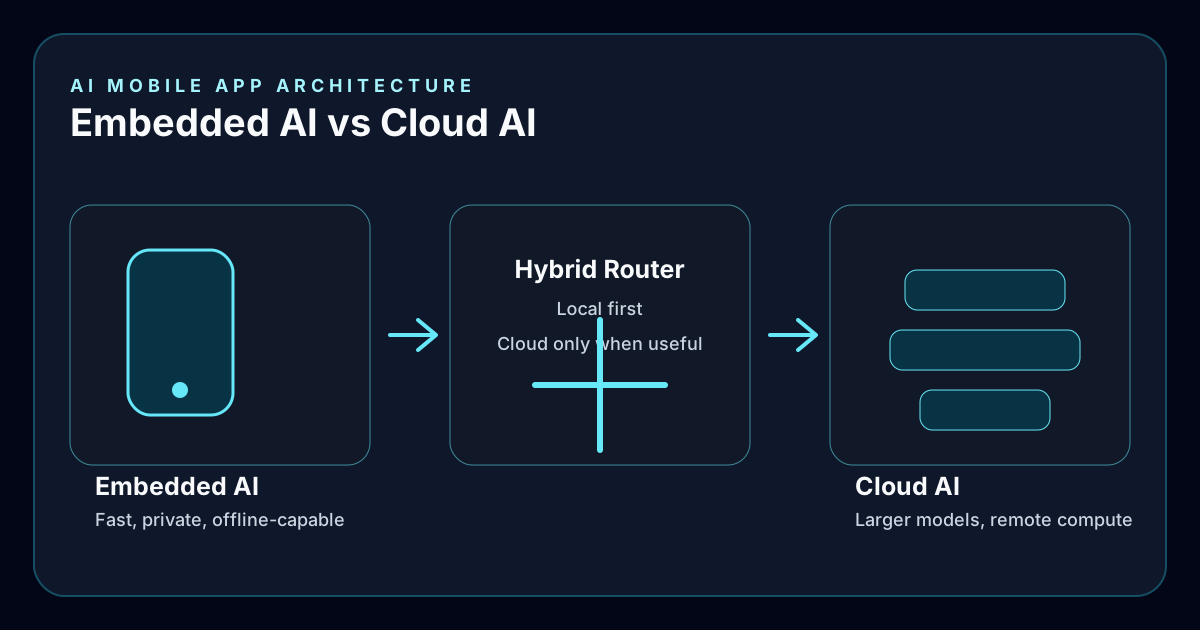
Embedded AI, cloud AI, and hybrid AI mobile application architecture diagram

Architecture Callout

Not sure if your idea should use embedded AI or cloud AI?

HerbDev offers AI architecture consulting to help businesses choose the right approach before investing in development. The right decision early can reduce future infrastructure costs and produce a faster, more reliable application.

Embedded AI

The intelligence runs directly on the user's device.

Instead of sending every request to a cloud server, the phone or tablet performs AI processing using local hardware built for machine learning. Modern mobile devices are capable AI computers, especially for camera, voice, classification, and pattern-recognition tasks.

Image recognition
Object detection
Document scanning
Speech recognition
Voice commands
Pose estimation
Body tracking
Text classification
Recommendation engines
Local chat assistants
Predictive analysis

Example

Construction site survey AI.

One practical use case is an embedded AI app for construction supervisors. The supervisor walks the project while recording video or taking photographs. The AI reviews the images and helps identify issues that need attention.

Missing safety equipment
Improper housekeeping
Material storage problems
Potential OSHA concerns
Missing PPE
Construction defects
Incomplete work
Quality control issues

The AI does not replace the supervisor. It becomes a second set of eyes that helps inspections move faster, documents findings more consistently, and reduces the chance that important issues are missed. Because much of the analysis can happen on the device, inspections can continue even when internet access is unavailable.

Architecture Comparison

Embedded AI and cloud AI solve different problems.

There is no single correct architecture for every AI mobile app. The best answer depends on the workflow, the data, the budget, and the environment where the app will be used.

Embedded AI
Cloud AI

Runs directly on the phone

Fast responses

Works offline

Better privacy

No per-request API fees

Lower latency

Limited by device hardware

Runs on remote servers

Depends on internet speed

Requires connectivity

Data leaves the device

Ongoing API costs

More powerful models available

More computing power available

Many successful apps use both.

The phone handles fast, private tasks locally. Larger or more complex AI requests go to cloud services only when necessary. This hybrid architecture often provides the best balance of speed, cost, and capability.

Embedded AI Advantages

Lower cost, better privacy, faster response, offline use.

Lower operating cost

Because the AI runs on the customer's device, you are not paying an AI provider for every request. That can reduce monthly operating expense as usage grows.

Better privacy

Healthcare, legal, financial, government, manufacturing, and construction organizations often prefer to keep sensitive data on the device whenever possible.

Faster user experience

For image recognition, body tracking, and camera analysis, local processing can feel immediate because the app is not waiting for a remote request.

Offline capability

Construction sites, warehouses, manufacturing facilities, remote locations, agriculture, mining, and emergency response work often need useful software even without reliable connectivity.

When Cloud AI Fits

Cloud AI still matters when the task is too large for the device.

Very large language models can perform tasks that would overwhelm a mobile device. The key is using cloud AI where it adds real value, not because every feature needs a remote model.

Long document summarization
Large research projects
Advanced reasoning
Enterprise knowledge bases
Multi-document analysis
Large-scale reporting
Company-wide AI assistants

Choosing the Architecture

The decision should happen before development begins.

During consulting, HerbDev evaluates the business problem before recommending embedded AI, cloud AI, or a hybrid architecture. The goal is measurable value, not AI for its own sake.

Privacy requirements
Internet availability
Expected number of users
Budget and operating cost
Required response time
Device capabilities
Long-term maintenance
Security requirements
Future scale

Industries

If employees carry a smartphone or tablet, there may be an AI workflow worth evaluating.

Construction Manufacturing Field service Property management Home inspections Agriculture Utilities Transportation Automotive service Healthcare Physical therapy Fitness coaching Photography Retail Hospitality Education Insurance inspections

Development Process

Start with the business problem, then choose the technology.

  1. 1 Discovery and requirements
  2. 2 AI feasibility review
  3. 3 Architecture recommendation
  4. 4 Prototype development
  5. 5 Mobile application development
  6. 6 AI integration
  7. 7 Testing with real-world data
  8. 8 Deployment
  9. 9 Ongoing enhancement

FAQ

Common questions about embedded AI mobile apps.

Does every AI app need internet access?

No. Many AI features can run entirely on modern mobile devices.

Can an embedded AI app still use cloud AI?

Yes. Many useful applications combine both approaches so local tasks stay fast and private while complex requests can escalate to the cloud.

Is embedded AI less expensive?

Often, yes. Because there are fewer API requests, operating costs can be significantly lower as usage grows.

Is embedded AI less capable?

Not necessarily. Embedded AI works very well for image recognition, pose estimation, object detection, and classification. Very large language models and complex reasoning usually still fit cloud AI better.

Can existing mobile apps add embedded AI?

In many cases, yes. Existing iOS and Android applications can often add AI features without rebuilding the entire application.

Glossary

Terms used in AI mobile app architecture.

API

A service interface that lets an application communicate with cloud-based systems, including AI providers.

Cloud AI

Artificial intelligence that runs on remote servers instead of directly on the user's device.

Embedded AI

Artificial intelligence that runs directly on a phone, tablet, or computer without relying on cloud processing for every request.

Hybrid AI

A combination of embedded AI and cloud AI working together.

Image recognition

AI that identifies objects, people, equipment, or conditions within photos or video.

Large language model

An AI model trained to understand and generate human language.

Machine learning

Technology that enables software to recognize patterns and improve performance based on data.

Object detection

AI that identifies and locates specific objects inside an image.

On-device AI

Another term for embedded AI that performs processing locally on the user's device.

Pose estimation

AI that detects body position and movement, often used in fitness, sports, rehabilitation, and safety applications.

Predictive analytics

Using AI to forecast outcomes based on historical data.

Computer vision

A branch of AI that enables software to interpret images and video.

Ready to explore an AI mobile app?

Choose the architecture before investing in development.

Whether you are starting with an idea or improving an existing application, HerbDev can help evaluate which AI approach makes the most sense for your business. The right architecture can improve performance, reduce long-term operating cost, increase privacy, and create a better experience for your users.