AI Agent Systems
The Agent Loop: How AI goes from answering questions to doing things.
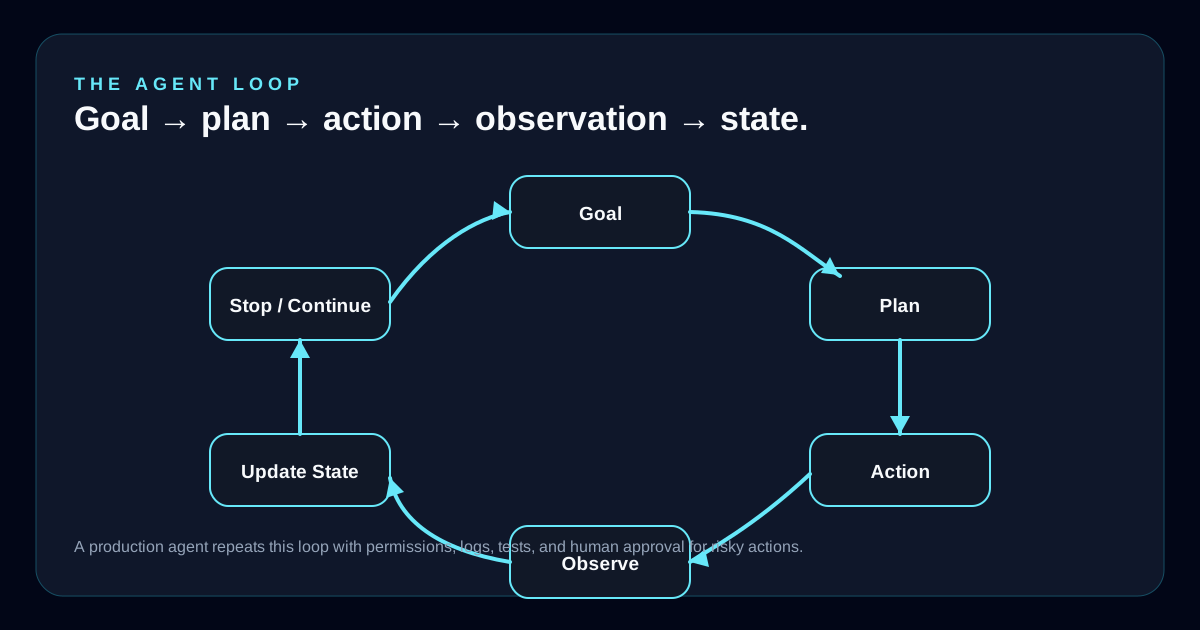
A chatbot produces a response. An agent runs a loop. It receives a goal, decides what to do next, calls a tool, reads the result, updates its state, and repeats until the work is complete or needs human judgment.
Published 2026-04-18 | By Herb Trevathan
Chatbot
Turns a prompt into an answer. Useful for explanation, drafting, classification, and analysis.
Agent
Turns a goal into a sequence of actions. Useful when the system must inspect, decide, call tools, and update state.
Production System
Wraps the agent with permissions, logs, approvals, tests, recovery, monitoring, and human ownership.
Core Idea
The loop is what turns language into work.
A normal AI response is mostly one pass: prompt in, answer out. An agent adds control flow. It can pause after each step, inspect the result, and decide what should happen next. That makes the model more useful, but it also creates new risk because the output may affect files, databases, customer records, deployments, or real people.
The loop does not make the model magically reliable. It creates a structure where reliability can be engineered: narrow tools, approval gates, observable state, tests, and fallback paths.
1. Receive the goal
The agent starts with a user request, system instructions, business rules, available tools, permissions, and any relevant context.
2. Build a short plan
The model decides what it needs to know, which tool may help, what can be answered directly, and what should require approval.
3. Take one action
Instead of doing everything at once, the agent makes one tool call, retrieves one document, writes one draft, or asks one clarifying question.
4. Observe the result
The system reads the tool output, error message, returned data, file diff, API response, or user answer.
5. Update state
The agent tracks what has changed, what remains unresolved, what risk increased, and whether the next step is still valid.
6. Continue or stop
The loop repeats until the task is complete, blocked, unsafe, too uncertain, or ready for a human decision.
Tools
An agent needs tools, but tools need boundaries.
A tool can be a search function, database query, calendar lookup, file editor, payment API, deployment command, or internal business system. The model chooses the tool and fills in the tool arguments. The surrounding software executes the call and returns an observation.
This is where agent design becomes software architecture. The model should not have vague unlimited access. Each tool needs a clear purpose, a typed input shape, known failure behavior, and logging.
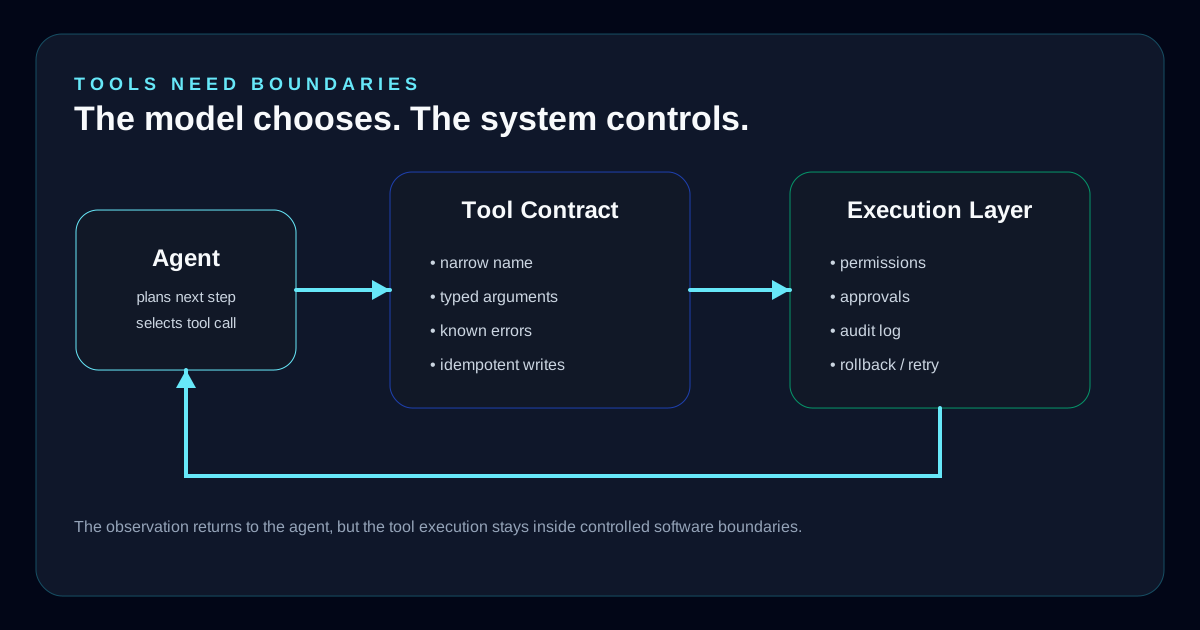
- Tools should have narrow names and clear schemas so the model knows exactly what action is possible.
- Read-only tools are safer than write tools. Start with lookup, search, summarize, classify, and inspect before allowing updates.
- Write tools need approval rules, audit logs, retries, rollback plans, and idempotency so repeated calls do not create duplicate work.
- Sensitive actions such as payments, account changes, customer messages, deployments, and data deletion need human gates.
Production Layers
The agent is only one part of the system.
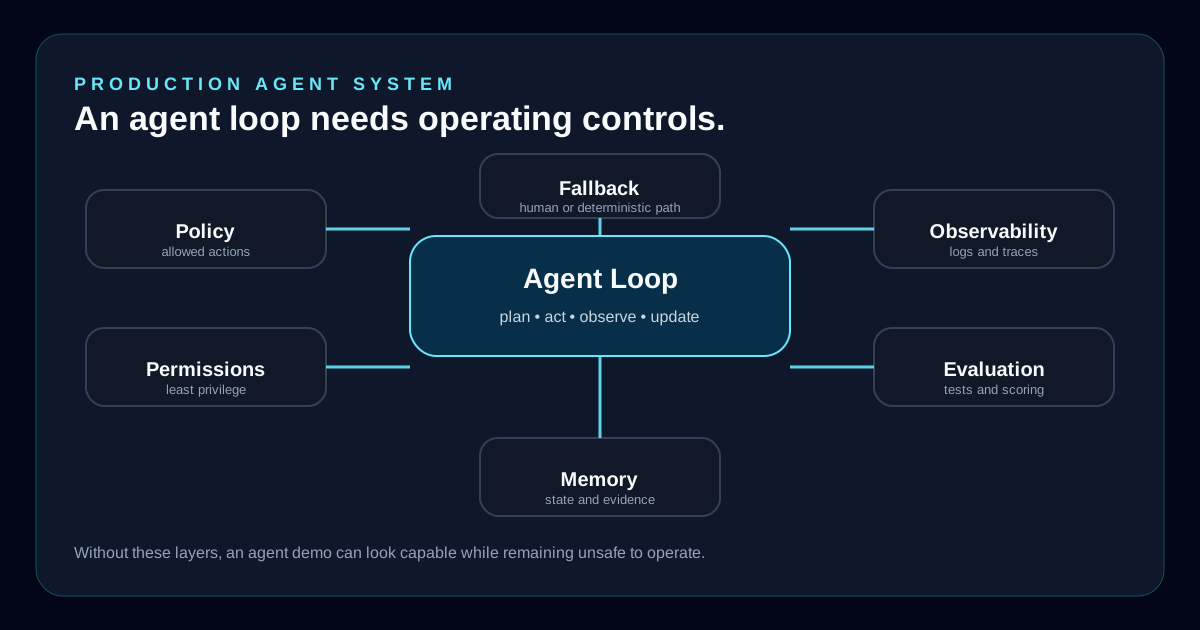
A useful demo can be one model and one tool. A production workflow needs more. It needs policy, permissions, state management, logs, evaluations, approvals, and a way to stop when the model is uncertain.
That is the difference between an impressive prototype and a business system a team can operate.
Policy
Defines what the agent is allowed to do, what requires approval, and what must be refused or escalated.
Permissions
Limits the agent to the minimum tools, data, accounts, and environments needed for the task.
Memory
Stores useful state, preferences, prior work, and evidence without letting stale context quietly control future actions.
Observability
Records prompts, tool calls, returned data, decisions, confidence, approvals, and final outcomes.
Evaluation
Tests whether the agent completes the workflow correctly, safely, repeatedly, and within cost and latency limits.
Fallback
Moves uncertain, risky, failed, or low-confidence work to a human or a simpler deterministic path.
Examples
The loop shows up in ordinary business workflows.
An agent is most useful when the work has a repeatable shape but still requires judgment. The model does not replace the workflow. It moves through the workflow with software controls around it.
Scheduling
Find the customer, check appointment history, inspect route availability, propose options, save a pending request, and wait for operations approval.
Claims
Classify the claim, retrieve policy rules, compare repair history, estimate replacement cost, score confidence, and escalate exceptions.
Software rescue
Inspect the repo, identify build failures, read logs, change one file, run tests, observe errors, and continue until the release blocker is isolated.
Failure Modes
Agent failures are often process failures.
Most agent problems are not dramatic. They are ordinary software problems with a model in the middle: unclear requirements, missing state, weak permissions, incomplete data, bad retries, vague tool contracts, and no audit trail.
Watch for
- The agent takes action before it has enough context.
- The agent chooses the wrong tool because tool names or descriptions are vague.
- A tool returns partial data and the agent treats it as complete.
- A previous step fails silently and every later step builds on the wrong state.
- The agent repeats a write action and creates duplicate records, messages, or jobs.
- The agent follows instructions embedded inside a web page, document, email, or tool output.
- The workflow works in a demo but has no audit trail, approval path, or recovery plan.
HerbDev Perspective
The agent loop needs senior ownership.
The hard part is not getting a model to call a tool. The hard part is deciding which tools it should have, when it should stop, what it should remember, what it must never do alone, and how the business can prove the workflow is working.
A reliable agent workflow is designed like production software: small steps, visible state, limited permissions, measured outcomes, human approval where risk is real, and a clear owner when something breaks.