1. Plain-language summary
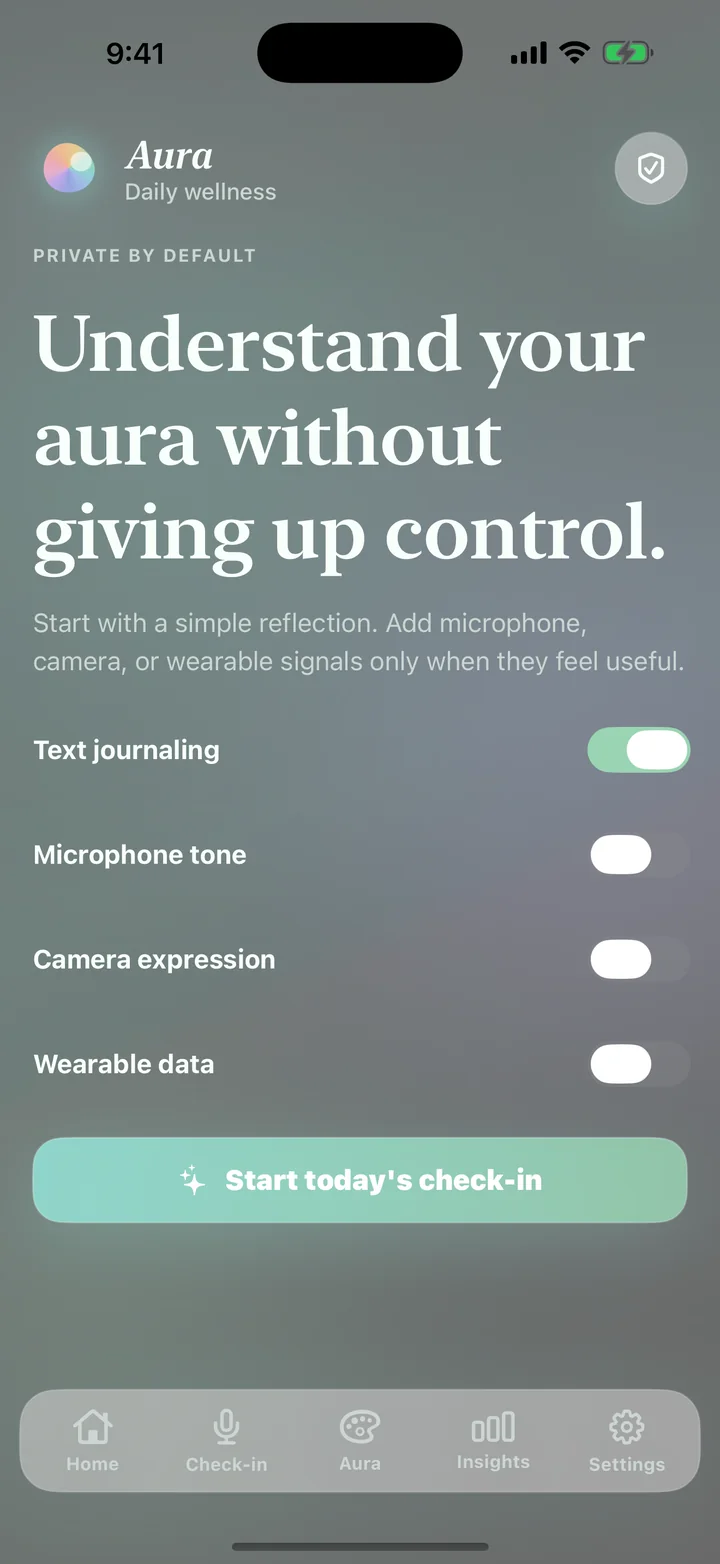
Aura is a wellness prototype that turns a reflection and optional signals into a color-based aura reading and lightweight wellness suggestion. In the current build, the app does not create a user account, connect to an Aura-operated backend, or include third-party advertising or analytics software.
Journal entries are used while the app is open. When a user chooses to save an aura reading, the resulting reading and settings are stored locally on that device. Aura can optionally read approved Apple HealthKit or Android Health Connect signals. The user can turn those signals off and reset local Aura data from Settings.
2. Information Aura handles
Information the user provides
- Written journal or check-in text entered in the app.
- A self-selected mood such as Calm, Open, Tender, Focused, Activated, or Heavy.
- Optional settings, custom aura labels, and personalization choices.
- Share-card choices and any information the user intentionally sends through the device sharing tools.
Optional device and wellness signals
- Apple HealthKit: sleep, steps, heart rate, resting heart rate, heart-rate variability, exercise, and mindfulness information that the user separately approves.
- Android Health Connect: sleep, steps, heart rate, resting heart rate, heart-rate variability, and mindfulness information that the user separately approves.
- Microphone and camera: the current interface contains optional voice-tone and facial-cue controls. Live audio/video analysis is a prototype concept and is not implemented as an Aura cloud collection service in this repository.
Information not collected by the current code
The reviewed repository does not contain an Aura user-account system, cloud database, advertising SDK, third-party analytics SDK, location tracking, contact-book access, or payment processing.
3. How information is used
Aura uses enabled information to provide the feature the user requested. This includes displaying the check-in, generating the prototype aura explanation, showing which signals are on or off, saving selected readings locally, presenting history, remembering settings, and creating a share card.
Health information is used only to add optional wellness context to an aura reading. Aura does not use health information for advertising, sell it to data brokers, or use it to make medical decisions.
4. Local storage, retention, and deletion
On iOS, app settings and saved aura readings are stored through local device preferences. On Android, they are stored through local app preferences. The data remains until the user deletes saved readings, selects Reset local Aura data, removes the app, or clears the app's storage through device settings.
The current app does not provide an Aura cloud account, so there is no remote Aura account record to delete. If a future release introduces accounts or server storage, it must provide appropriate account and data-deletion controls and update this policy.
6. Permissions and user choices
- Users can leave microphone, camera, and wearable signals off and continue using text or mood choices.
- Apple Health and Health Connect permissions are controlled by the operating system and may be revoked through device settings.
- Wearable signals can be disconnected inside Aura Settings.
- Saved readings can be deleted and local Aura data can be reset from inside the app.
- Share-card details remain selectable before a user confirms sharing.
7. Security, international use, and children
Aura uses the security protections supplied by iOS and Android for local app storage and protected health stores. No method of storage is completely secure, so users should protect their device with a passcode and keep its operating system current.
Aura is not directed to children under 13, or the minimum digital-consent age required in a user's country. The current app does not knowingly create child profiles or collect children's information through an Aura account service.
8. Changes and contact
We may revise this policy as Aura changes. The effective date at the top will be updated when material changes are published. Users should review the current version before enabling newly introduced data features.
Privacy and support requests should be sent through the developer contact listed on Aura's current Apple App Store or Google Play listing. Include the app version, device platform, and a description of the request. Do not include private journal or health details unless they are necessary to resolve the request.